
 The Video Games
Starting at 2:00 p.m. PDT today, members of the Xbox One Preview Alpha – Skip Ahead and Preview Alpha rings will begin receiving the latest Xbox One system update (1810.180725-1920). Learn more about the new features in development for 1810 here, and read on for a list of fixes and known issues in this 1810 system update.
Important Build Notes
Avatars
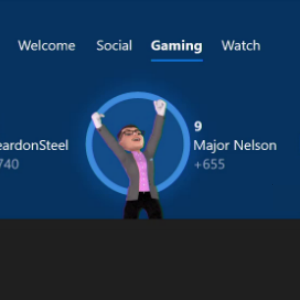
We’ve received feedback that the integration of Avatars on console has been a bit confusing due to the use of phrases like “Avatars on Home” and “Avatars on Dashboard,” so we wanted to clear up a few things. Currently, Avatars are visible to Xbox Insiders in the Alpha Skip Ahead and Alpha Rings in the following places: the Avatar Editor, activity feed, leaderboards, and the Profile.
Fixes
GameDVR
- Resolved the error message that Something Went Wrong Try Again Later when recording Game Clips.
Groups
- Fixed an issue in which some users would encounter the game not being added when adding a game to a group while installing the game.
My Games and Apps
- Users should no longer experience Various Games and Apps failing to launch with no error code which required a title uninstall and reinstall. This fix will resolve the issue when you launch the title.
- Users should no longer experience an issue with the Store app erroring out with the (0x80070bfa) error when browsing/launching the Store.
Networking
- Fixes to resolve the issue with Wireless and Wired networks failing to be detected when the console wakes from Instant on/connected standby.
Settings
- Users can now save profiles in the Xbox Accessories app.
- The settings for Blu-ray player audio passthrough is no longer broken when Dolby Atmos bitstream out is enabled.
Virtual Keyboard
- The Virtual Keyboard will no longer auto close before the user can enter in their password when adding new accounts.
- We have resolved the issue where users experienced various keys & controller shortcuts for the virtual keyboard are not being recognized. Certain keys (spacebar, @ symbol, – symbol) were not registering when being pressed on the keyboard (both the virtual keyboard and via a USB keyboard)
Known Issues
Avatars
- It can take up to 10 seconds to view an Avatar on the profile screen the first time after your console has flashed.
Microsoft Edge
- The cursor may disappear when exiting and re-entering the app
- Workaround: Press Y when re-entering the app to make the cursor re-appear
Profile Color
- Sometimes users may encounter an incorrect Profile color when powering on the console.


GIPHY App Key not set. Please check settings